
sonarr

Synology Sonarr torrent workaround after Kickass went offline


sonarr Synology_Logo.svg


KickassTorrents


The following process will not enable Sonarr to download the torrents as before. Instead, it is a workaround in order to Synology Download Station to do the actual search/downloading and Sonarr to do the rest; archiving, renaming etc.

Sonarr configuration should remain as is.

Step 1

Visit https://showrss.info/ and create an account.

Step 2

Navigate to “My Shows” tab and add all the TV shows, you want Download Station to monitor, in the list.
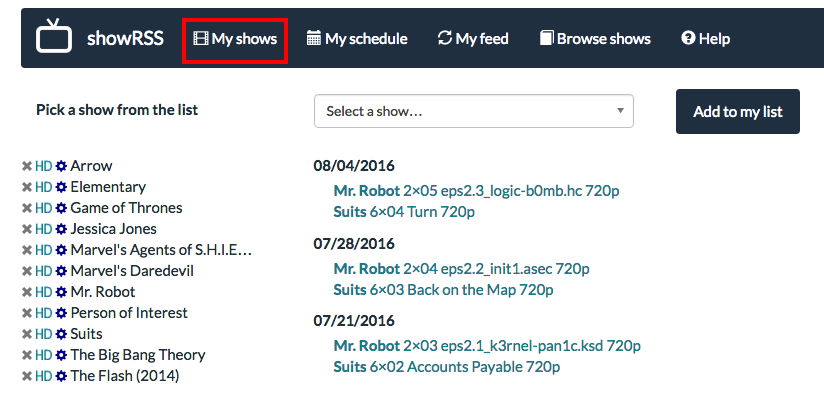
Screen Shot 2016-08-06 at 14.33.02

Step 3

Then select the settings icon Screen Shot 2016-08-06 at 14.33.18 for every show and select the required quality and whether to download the repack versions.
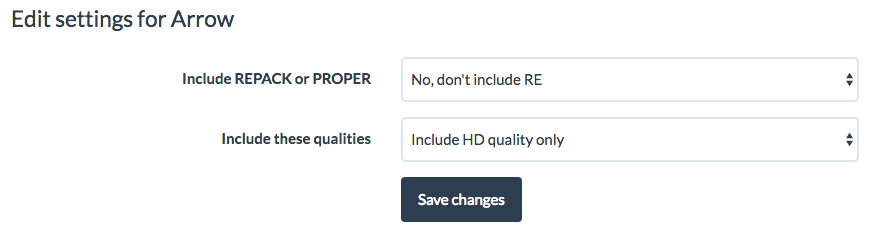
Screen Shot 2016-08-06 at 14.33.54

The final outcome should look something like the image of step 2.

Step 4

After completing the setup, navigate to “My Feed” tab and copy the custom feed address that showrss will generate for you.

Step 5

Open Download Station in Synology and Navigate to Settings and RSS menu. There you can set the update interval (every how long to check for new torrents). Press OK.
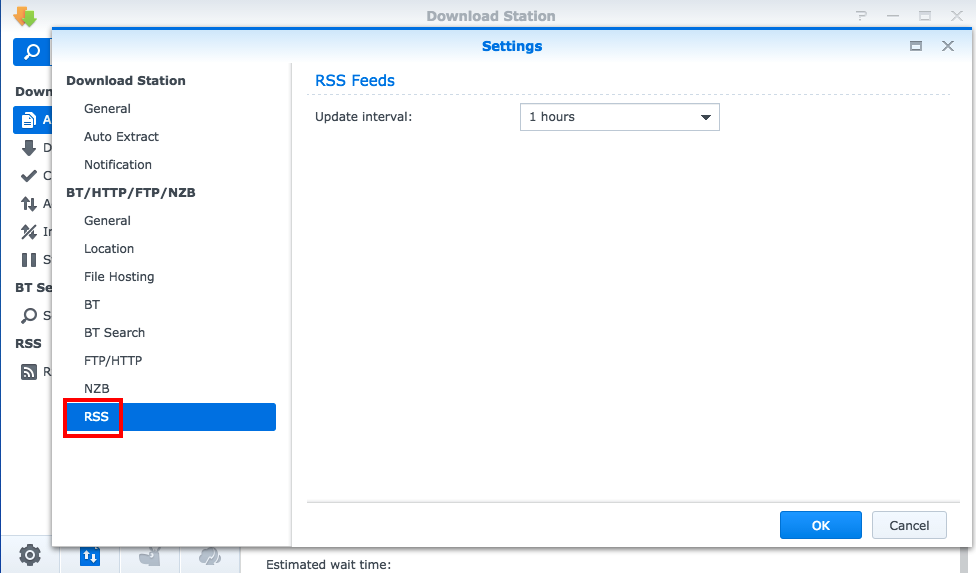
Screen Shot 2016-08-06 at 14.39.05

Step 6

Then navigate to RSS Feeds section of Download Station and select the + sign on the top. Paste the URL copied from “My Feed” tab of showrss.info and tick the box “Automatically download all items”. Press Add.
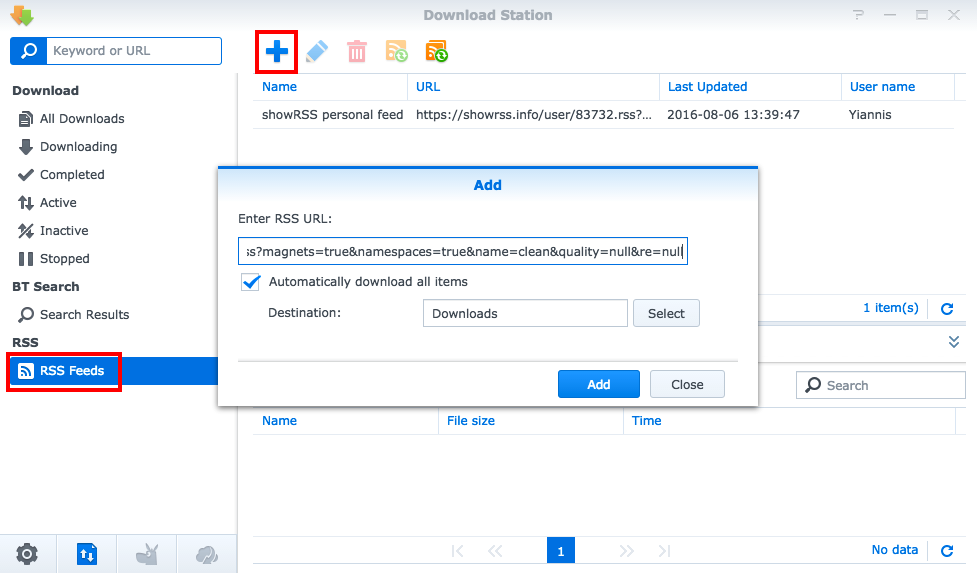
Screen Shot 2016-08-06 at 14.41.54

Step 7

Pray to the internet gods that everything works as expected!

Similar Posts

  • New Web Design

    Plenty of free time recently and I decided to change my website’s theme to follow the latest web trends. This template is dedicated to photography, giving blogging a secondary role. During the porting of old posts to this new design, some links and pictures got broken. If you are here to view or download any…

  • Crack WEP using KisMAC

    Things you need: An Intel based macbook (other may work) Time! First thing you need to do is to download and install KisMAC. You can do this from http://kismac-ng.org/. Then launch the program and open Preferences. Go to Driver tab, select Apple Airport Extreme card, passive mode and click Add. Then Select All channels and…

  • Windows Folder Lock

    Have you ever needed to lock your personal folder so that no one can access is unless they know the secret password? I have personally searched for such applications many times but all solutions seem to be complex such creating partitions with encryption and so on. Finally I had some free time and decided to create my…

  • PuTTY SSH Tunneling

    This post explains how PuTTy SSH Tunneling can be easily used to bypass firewall rules blocking ports. Let’s say that we have the following setup where only communication via port 22 is allowed between two hosts: Step 1: Open profile and load server’s profile Step 2: Navigate to Connection->SSH->Tunnels and add new port as the…

One Comment

Leave a Reply

Your email address will not be published. Required fields are marked *

This site uses Akismet to reduce spam. Learn how your comment data is processed.